[Development] ESM, CJS, tsdown
ESM, CJS, tsdown
간단한 유틸 함수 NPM 라이브러리 배포해보기를 보고 라이브러리 배포를 공부하던 중에 겪었던 에러에 대해서 해결했던 과정을 기록해보고자 한다.
문제 발견
라이브러리 package.json을 아래와 같이 설정해 두었다.
1
2
3
4
5
6
7
8
9
10
11
12

{
  "type": "module",
  "main": "dist/index.js",
  "license": "MIT",
  "exports": {
    ".": {
      "import": "./src/index.js",
      "require": "./src/index.cjs",
      "types": "./dist/src/index.d.ts"
    }
  }
}
arethetypeswrong에서 검사해 보니 Masquerading as ESM 문제가 발생했다.
| 환경 | 결과 |
|---|---|
| node10 | ✅ |
| node16 (from CJS) | 🐛 Masquerading as ESM |
| node16 (from ESM) | ✅ (ESM) |
| bundler | ✅ |
원인 분석
원인은 하나의 .d.ts 파일을 ESM과 CJS 엔트리 모두에 사용했기 때문이다.
Node는 파일 확장자와 package.json의 type 필드를 보고 ESM인지 CJS인지 결정한다. TypeScript도 같은 맥락에서 타입 선언 파일의 확장자에 따라 대응하는 런타임 파일을 찾아간다.
| 타입 선언 파일 확장자 | 대응하는 런타임 파일 |
|---|---|
.d.cts |
.cjs |
.d.mts |
.mjs |
.d.ts |
.js (가장 가까운 package.json의 type 필드를 따름) |
따라서 타입 선언 파일이 .d.ts이고 "type": "module"로 되어 있다면, TypeScript는 이 선언 파일을 ESM용으로 해석한다.
결과적으로 TypeScript는 이 패키지를 ESM 타입 선언을 가진 모듈로 이해하지만, 실제 런타임에서 require 조건은 CommonJS 파일을 가리키게 된다. 타입 선언이 나타내는 모듈 형식과 실제 JavaScript 파일의 모듈 형식이 어긋나면서 문제가 발생한다.
해결 방법
문서에서는 2가지 방법을 제시한다.
방법 1. 타입 선언 파일 분리
ESM용 선언 파일(.d.ts 또는 .d.mts)과 CJS용 선언 파일(.d.cts)을 분리해서 각각의 런타임 파일과 1:1로 대응시킨다.
1
2
3
4
5
6
7
8
9
10
11
12
13
14
15
16

{
  "name": "pkg",
  "type": "module",
  "exports": {
    ".": {
      "import": {
        "types": "./index.d.ts",
        "default": "./index.js"
      },
      "require": {
        "types": "./index.d.cts",
        "default": "./index.cjs"
      }
    }
  }
}
방법 2. exports에서 types 제거
types 필드를 제거하고 TypeScript가 스스로 타입을 결정하도록 한다.
1
2
3
4
5
6
7
8
9
10

{
  "name": "pkg",
  "type": "module",
  "exports": {
    ".": {
      "import": "./index.js",
      "require": "./index.cjs"
    }
  }
}
문제점: 방법 2로 진행했더니 이번엔 “No types” 문제가 새로 발생했다. 결국 방법 1처럼 각각의 타입 선언 파일을 따로 만들어야 했다.
tsdown 도입
각각의 타입 선언 파일을 만들기로 했지만, 기존에 사용하던 esbuild는 타입 선언 파일을 생성해주지 않는다. 타입 선언 파일 내용이 같더라도 괜찮다고 해서 복사하는 방법도 고려했지만, 설정 비용이 더 클 것 같아 다른 번들러를 찾아보았다.
이전에 사용했던 tsup을 사용해보려 했지만, tsup은 더 이상 유지보수 계획이 없고 tsdown으로 마이그레이션을 안내하고 있다.

주요 기능
Output Format |
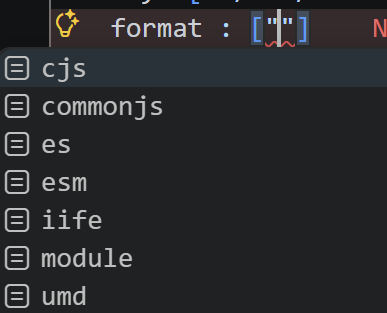
tsdown은 기본적으로 JS 코드를 ESM으로 생성한다. 이 외에도 cjs, iife, umd 등의 포맷도 지원한다.
Dependencies |
devDependencies만 번들에 포함되며, 실제로 import / require되어 사용되는 의존성만 선별해서 포함시킨다. node_modules에는 있지만 package.json에는 없는 Phantom Dependencies도 동일하게 처리한다.
Auto-Generating Package Exports |
tsdown은 package.json의 exports, main, module, types 필드를 자동으로 추론하고 생성해주는 기능이지만 아직 실험단계이다.
Declaration Map |
원본 .ts 소스코드와 .d.ts 파일을 매핑해주는 옵션이다.
Performance Considerations |
.d.ts 파일 생성은 tsconfig.json 설정에 따라 달라진다.tsconfig.json 내 isolatedDeclarations: true인 경우에는 oxc-transform 사용하고 그 외의 경우에는 tsc를 **사용한다. oxc-transform를 사용하는 경우가 상대적으로 더 빠르다고 한다. 속도가 중요하다면 설정해보는 것도 좋을 것 같다.
설치 및 설정
1

$ npm install -D tsdown
tsdown.config.ts 설정
1
2
3
4
5
6
7
8
9

import { defineConfig } from "tsdown";

export default defineConfig({
  entry: "./src/index.ts",
  format: ["esm", "cjs"],
  dts: {
    sourcemap: true,
  },
});
package.json (변경 후)
1
2
3
4
5
6
7
8
9
10
11
12
13
14
15
16
17
18
19
20
21
22
23
24
25
26
27

{
  "name": "yunhae-utils",
  "version": "1.0.5",
  "type": "module",
  "main": "dist/index.js",
  "license": "MIT",
  "exports": {
    ".": {
      "import": {
        "types": "./dist/index.d.mts",
        "default": "./dist/index.mjs"
      },
      "require": {
        "types": "./dist/index.d.cts",
        "default": "./dist/index.cjs"
      }
    }
  },
  "scripts": {
    "prepack": "yarn build:tsdown",
    "build": "yarn clean && yarn build:tsc && yarn build:js",
    "build:tsdown": "yarn clean && tsdown",
    "build:tsc": "yarn tsc --emitDeclarationOnly",
    "build:js": "node build.js",
    "clean": "rm -rf dist"
  }
}
1

$ yarn build:tsdown
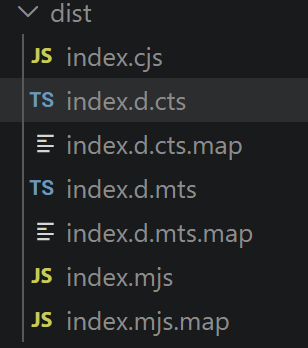
tsdown 빌드 후 dist 폴더에 생성되는 파일들:
1
2
3
4
5
6
7
8

dist/
├── index.cjs
├── index.d.cts
├── index.d.cts.map
├── index.d.mts
├── index.d.mts.map
├── index.mjs
└── index.mjs.map
1

$ npm version patch
1

$ npm publish
결과
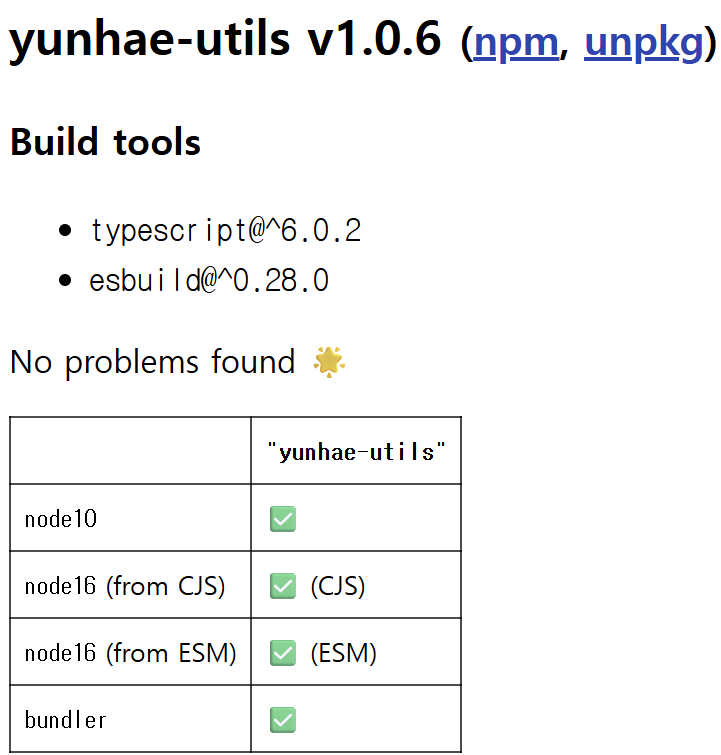
| 환경 | 결과 |
|---|---|
| node10 | ❌ Resolution failed |
| node16 (from CJS) | ✅ (CJS) |
| node16 (from ESM) | ✅ (ESM) |
| bundler | ✅ |
node10 환경에서는 exports 필드를 해석하지 못한다. ATTW 문서도 exports를 쓰는 패키지는 node10 해석에서 실패할 수 있다고 설명하고 있다. 해결 방안은 추후에 찾아볼 예정이다.
(2026년 4월 9일 업데이트)
node10에서 failed가 난 이유는 pakage.json의 main필드에 "main": "dist/index.js" 이렇게 작성했기 때문이다. 빌드 결과물에는 mjs, cjs 만 있고 js파일은 없다. "main": "dist/index.mjs"로 바꾸어 주니 해결 되었다.
참고문헌
간단한 유틸 함수 NPM 라이브러리 배포해보기 (feat. TypeScript 지원, ESM 지원)